Nmap Scanning Techniques - Traffic Analysis and PCAP Identification
August 6, 2025 • Traffic Analysis

A comprehensive guide to Nmap scanning techniques including SYN, Connect, FIN, NULL, XMAS, UDP, and ACK scans, explained with traffic analysis and PCAP identification.
Deep Dive into Nmap Scanning Techniques
From a defensive (blue team) perspective, understanding port scanning is critical for detecting and responding to potential intrusions. Attackers rely on scanning techniques to discover which services are running, which ports are open, and how firewalls respond. For defenders, recognizing the different scanning patterns in network traffic is essential for identifying reconnaissance activity early in the attack chain.
In this post, we will analyze several common Nmap scans, explain how they generate network traffic, and demonstrate how they can be identified within packet captures (PCAP). By studying these signatures, blue teams can improve their detection capabilities, tune intrusion detection systems (IDS), and strengthen network monitoring strategies against reconnaissance attempts.
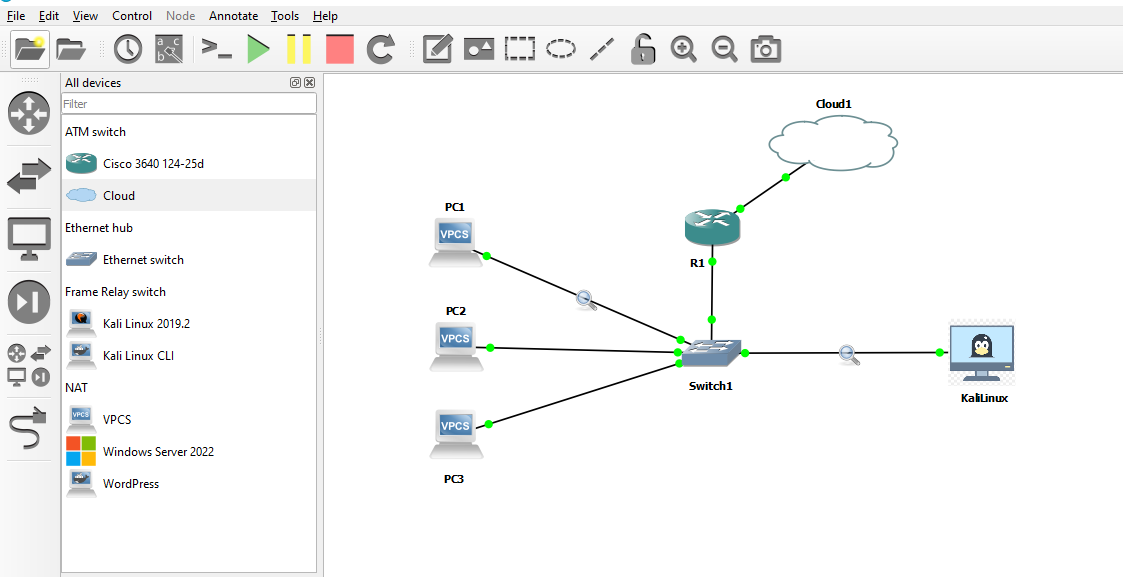
For demonstration purposes, the scans were performed in a GNS3 virtual lab environment consisting of one Kali Linux machine as the attacker, a switch, three PCs as targets, and a router managing connectivity. The following diagram shows the setup used:
TCP SYN Scan (sS)
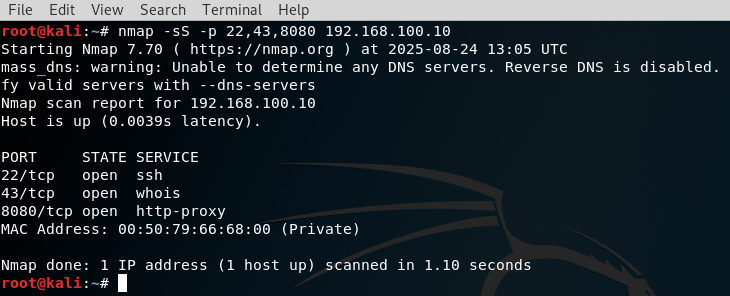
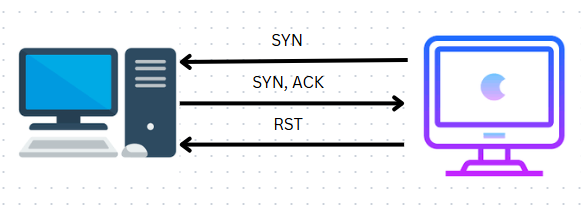
The TCP SYN scan, often referred to as a half-open scan, is one of the most widely used and stealthy techniques. It sends a SYN packet to initiate the handshake, and the response determines the state of the port. If a SYN/ACK is returned, the port is open. If the reply is a RST, then the port is closed. Unlike a normal connection, the scanner does not complete the handshake by sending the final ACK, making the scan more discreet.
Let’s start by scanning a target from our attacking machine:
The following diagram illustrates how the client and server interact during this process:
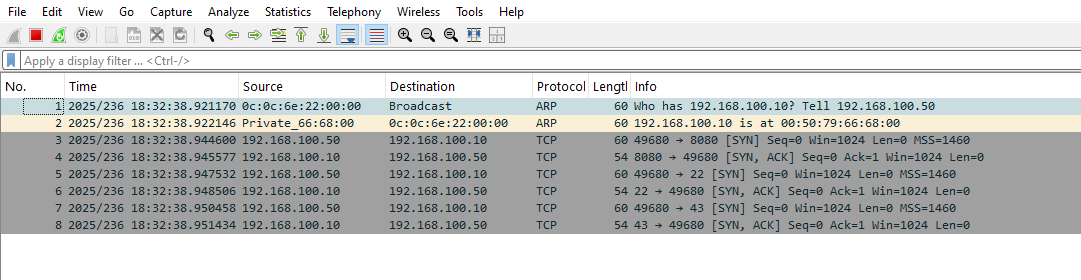
In captured network traffic, this scan can be identified by the abundance of SYN packets sent to different ports. Open ports respond with SYN/ACK packets, but the absence of ACK from the scanner reveals the stealthy nature of the scan. Closed ports instead respond with RST packets. Since no full TCP connection is established, the scan stands out in the PCAP as half-completed handshakes.
TCP Connect Scan (sT)
Unlike the SYN scan, the TCP Connect scan performs a full handshake using the operating system’s built-in networking API. This method is straightforward but noisier because every open port results in a complete TCP connection.
Here’s how the scan looks from the attacker’s perspective:
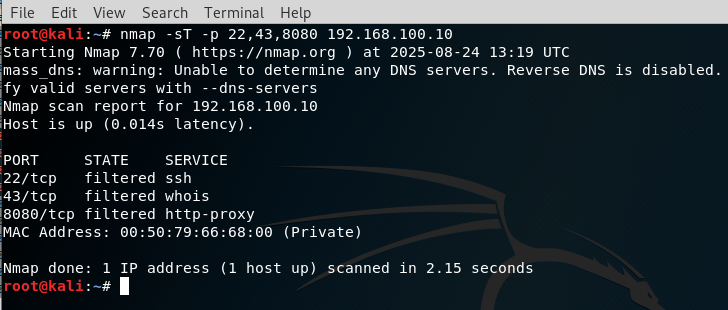
The diagram below shows the three-way handshake in action:
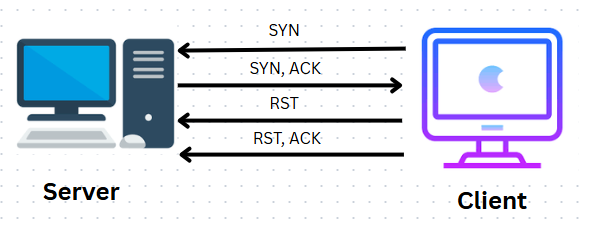
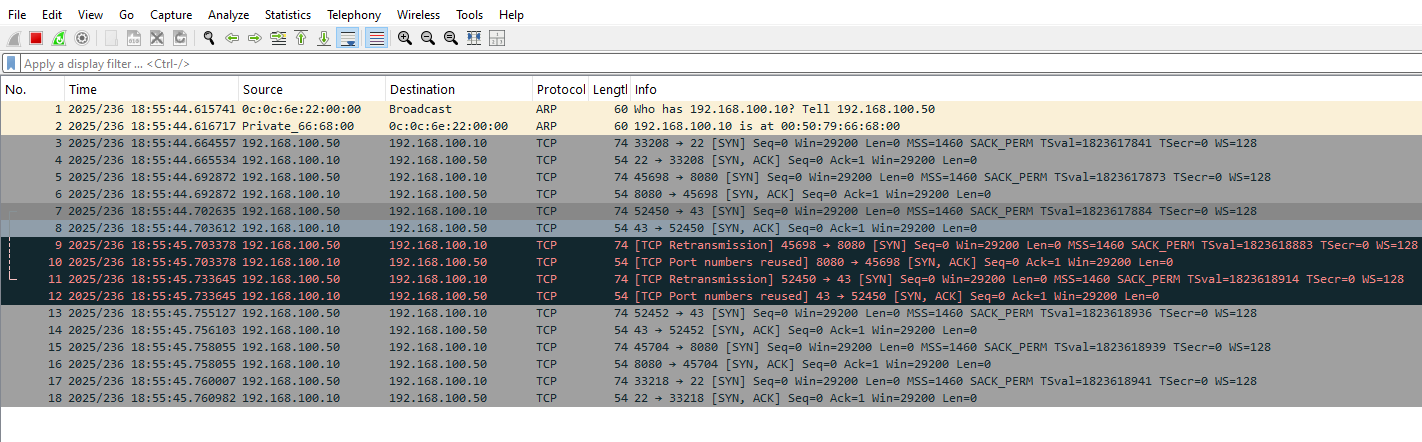
When the port is open, the handshake is fully completed (SYN → SYN/ACK → ACK), after which the scanner typically closes the connection using RST or FIN. For closed ports, the server responds with a RST immediately. This scan is easier to detect since it completes actual connections, making it slower and noisier than the SYN scan. However, it is often used when SYN scans are restricted, such as by user privileges.
In the PCAP, this technique is easy to spot because it leaves a trail of full TCP handshakes. Open ports display the entire SYN, SYN/ACK, and ACK sequence, while closed ports respond with RST.
TCP FIN Scan (sF)
The TCP FIN scan leverages the FIN flag, which is normally used to gracefully close a TCP session. When sent to a target port outside of an established connection, its behavior varies depending on the port’s state.
Scanning the target using this method:
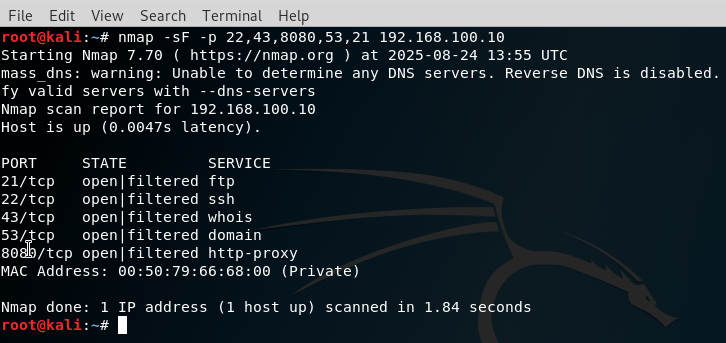
The diagram below explains the process:
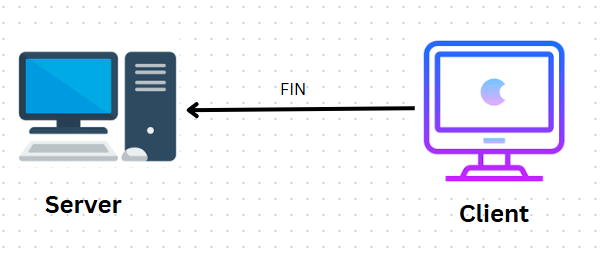
According to RFC 793, open ports silently ignore unsolicited FIN packets, meaning no response is seen in traffic captures. Closed ports, on the other hand, send a RST packet in reply. This subtle behavior allows the scanner to map port states with minimal noise.
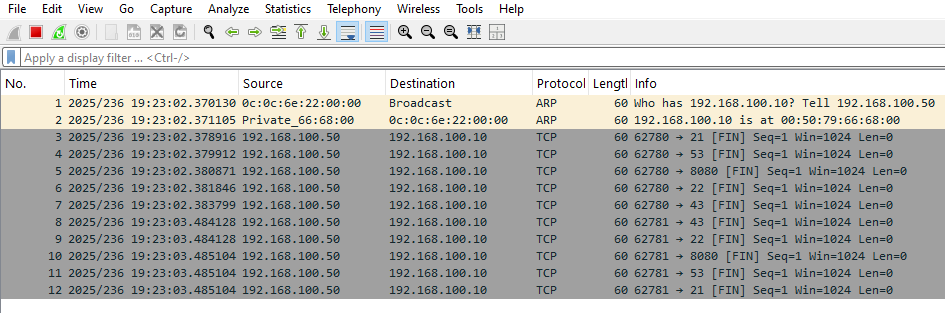
In the PCAP, you will observe outgoing FIN packets across multiple ports, RST packets from closed ones, and complete silence from open ports.
NULL Scan (sN)
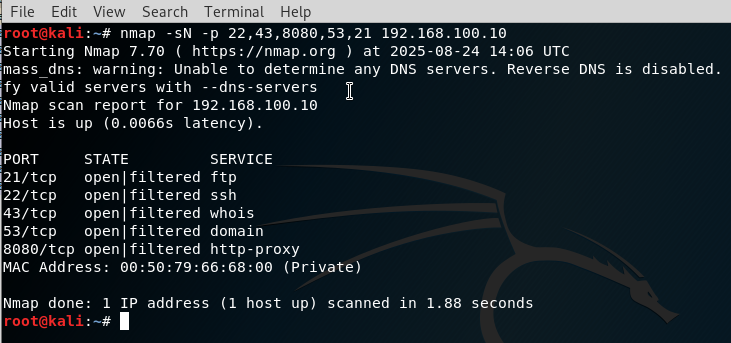
The NULL scan sends TCP packets with no flags set at all. This unusual packet structure provokes different responses depending on the port’s state.
Here’s the scanning process:
And the handshake diagram for this method:
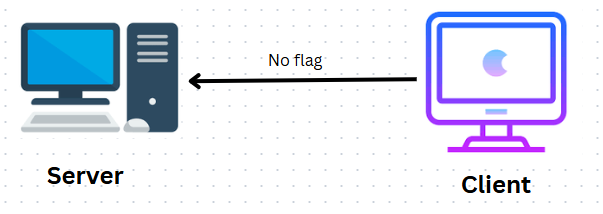
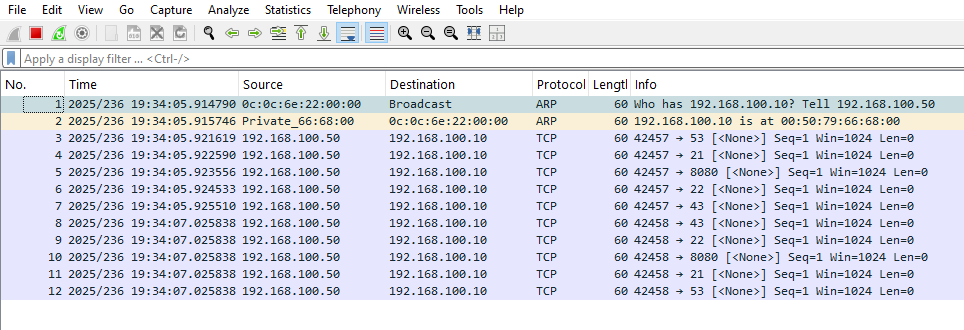
When the packet is sent to an open port, the system usually ignores it. Closed ports typically respond with RST. In PCAP traffic, this appears as a stream of packets without any flags, followed by RST replies from closed ports, while open ports remain silent.
⚠️ Note: On Windows systems, NULL scans are unreliable since Windows often responds with RST for all ports regardless of their state.
XMAS Scan (sX)
The XMAS scan is named because the packets light up with multiple flags FIN, PSH, and URG much like a Christmas tree. It shares similarities with the FIN and NULL scans in how it determines port status.
Attacking the target with an XMAS scan:
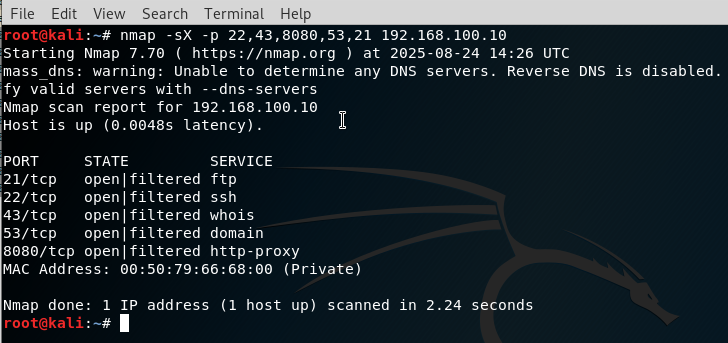
Diagram of the process:
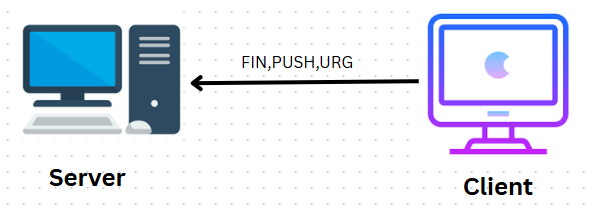
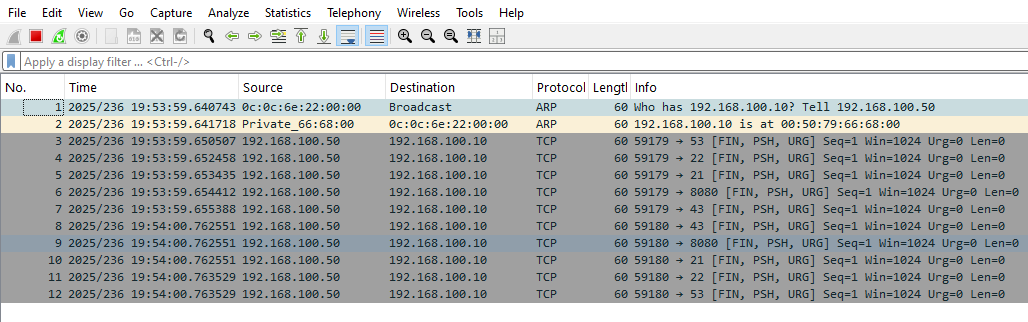
Open ports typically ignore such packets, while closed ports respond with RST. When analyzed in PCAP, the signature is clear: packets carrying FIN, PSH, and URG flags, silence from open ports, and reset responses from closed ports.
UDP Scan (sU)
The UDP scan works differently from the TCP methods, as it relies on connectionless communication. The scanner sends UDP packets to target ports, and the responses vary significantly.
Running the scan:
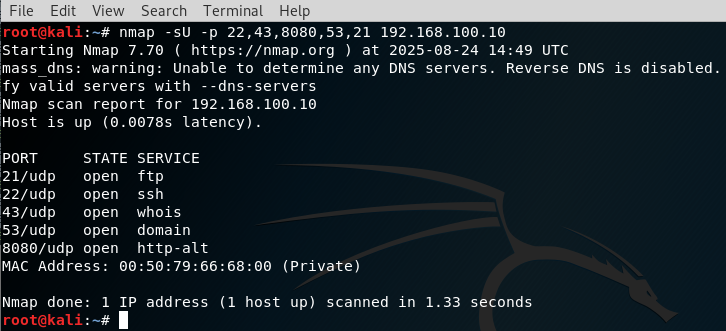
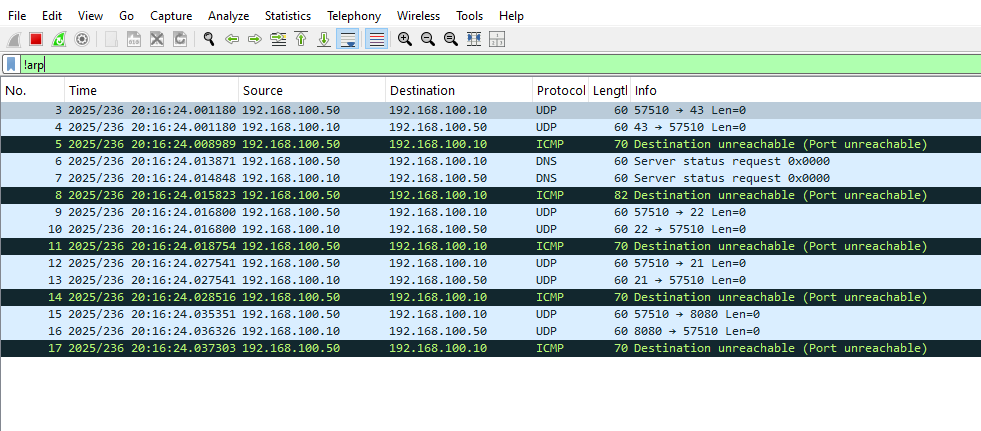
If the port is closed, the target often sends back an ICMP Port Unreachable message. Open ports may either reply with data (depending on the application) or remain silent. This lack of consistent behavior makes UDP scanning slower and more resource-intensive.
In captured traffic, outgoing UDP packets are visible, followed by ICMP Port Unreachable messages from closed ports, and either silence or valid UDP responses from open ones.
ACK Scan (sA)
The ACK scan takes a different approach. It does not determine whether a port is open or closed, but rather whether it is filtered by a firewall. By sending packets with only the ACK flag set, the scanner mimics part of an existing TCP session.
Let’s scan our target:
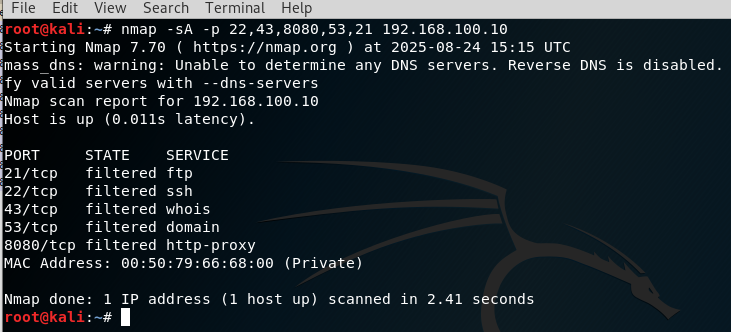
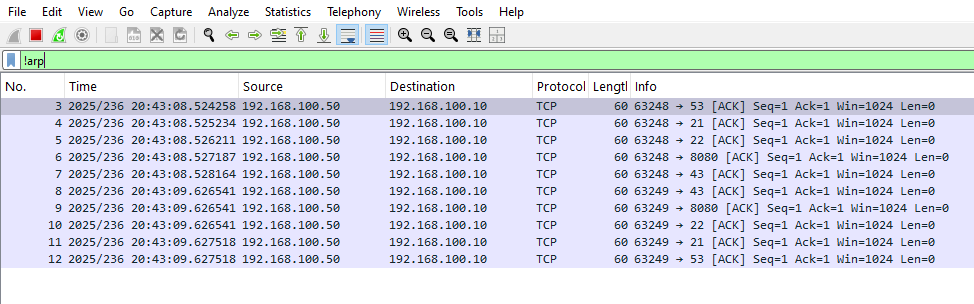
When a RST is received, it usually indicates that the port is unfiltered and reachable. If no reply or an ICMP error is seen, the port is likely filtered by a firewall.
In PCAP traffic, ACK scans appear as outbound TCP packets carrying only the ACK flag. Reset replies confirm unfiltered ports, while silence or unreachable messages point to filtering.
Conclusion
Nmap offers a wide variety of scanning techniques, each suited for different environments and objectives. SYN scans remain the most popular due to their balance of stealth and effectiveness. Connect scans, while noisy, are useful in restricted scenarios. FIN, NULL, and XMAS scans provide stealthier alternatives, though their reliability depends on the target system. UDP scans add another dimension by probing non-TCP services, and ACK scans are indispensable for firewall rule detection.