Reverse Thinking in Log Analysis: Detecting Advanced Threats by Looking for What’s Missing
January 26, 2026 • Logs analysis

A practical SOC methodology that flips traditional log analysis on its head. Learn how thinking like an attacker focusing on missing data, perfect patterns, quiet activity, and suspicious successes helps analysts detect advanced compromises faster using simple Linux commands and real world techniques.
Introduction
I have analyzed a bunch of logs and Here is a question that changed how I investigate incidents:
"If you wanted to break into a system and stay hidden, what would you do?"
Most security training teaches you to look FOR threats. But what if we flipped that? What if we learned to think like the attacker and then used that knowledge to expose them? i like Sun Tzu quote - If you know the enemy and know yourself, you need not fear the result of a hundred battles
This is Reverse Thinking - and it's the closest thing to a cheat code for log analysis.
In this guide, I will walk you through a complete methodology that transformed how I hunt threats. We went from spending hours chasing false positives to finding real compromises in minutes.
Let's dive in.
Understand Reverse Thinking
What Is Reverse Thinking?
Instead of asking, “What malicious activity can I find?” ask: “If I were the attacker, how would I avoid being detected?”
That’s why having offensive knowledge is highly recommended. Understanding what attackers do in an environment helps you detect them far more effectively. Once you understand their evasion techniques, you can flip those techniques into detection strategies.
Why This Works
Attackers are constantly evolving, and simply trying to keep up with trends is not enough. They know what defenders are looking for, so they:
- Delete their tracks
- Blend in with normal activity
- Operate during expected business hours
- Use legitimate and built-in system tools
This approach is commonly known as “living off the land.” To detect it effectively, you need a holistic mindset. I’ve documented some of these ideas here:
Must-Know Heuristic Techniques for Security Analysts
Traditional log analysis focuses on finding obvious “bad stuff.” Reverse thinking, however, looks for:
- Missing data
- Patterns that are too perfect
- Unexpected silence
- Behavior that seems too normal
This is how you catch real criminals especially advanced ones because evasion is where they invest most of their effort and thats what make them stand out
Let's put this into practice.
Finding What's MISSING
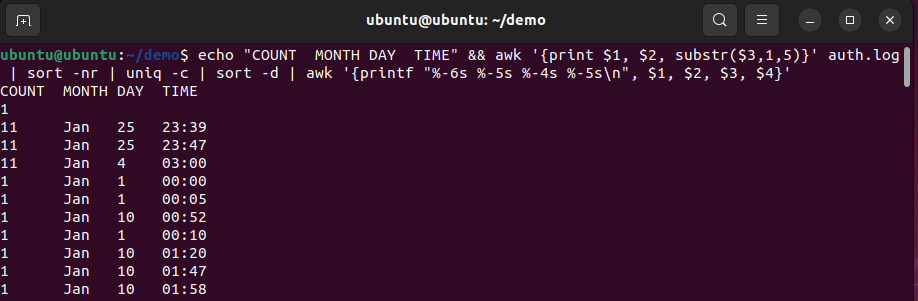
You're investigating a potential breach. You pull up /var/log/auth.log and start looking for failed logins. Everything looks... normal. Too normal. Traditional Approach vs Reverse Thinking Traditional: Look for failed login attempts while reverse: Look for MISSING time periods in logs. The Attack Technique We're Countering Smart attackers delete logs after compromise. They might clear specific hours or rotate logs prematurely. They bet you won't notice the gaps. Let's Detect It Step 1: Check for Time Gaps Open your terminal and run:
bashecho "COUNT  MONTH DAY  TIME" && \
awk '{print $1, $2, substr($3,1,5)}' auth.log \
| sort \
| uniq -c \
| sort -nr \
| awk '{printf "%-6s %-5s %-4s %-5s\n", $1, $2, $3, $4}'
In a normal 24/7 server, you should see activity every hour. If you see:
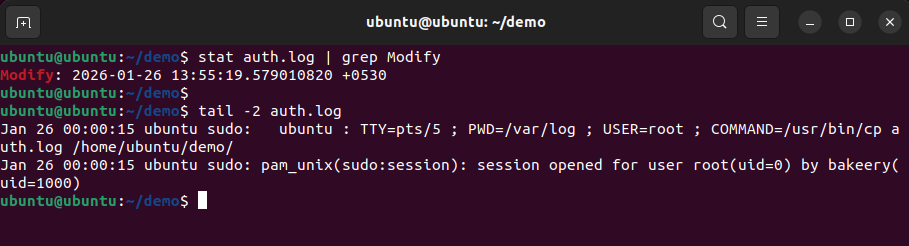
bashstat /var/log/auth.log | grep Modify
then, Then compare with the last logged event:
bashtail -3 /var/log/auth.log
The "Too Perfect" Pattern Detector
The Scenario You're reviewing failed login attempts. Brute force attack, right? But something feels... off. The Attack Technique Sophisticated attackers use slow, timed attacks. Exactly 60 seconds between attempts. Why? To stay under threshold-based detection (like fail2ban's default 6 attempts in 10 minutes). Let's Expose This Step 1: Look for Unnatural Timing
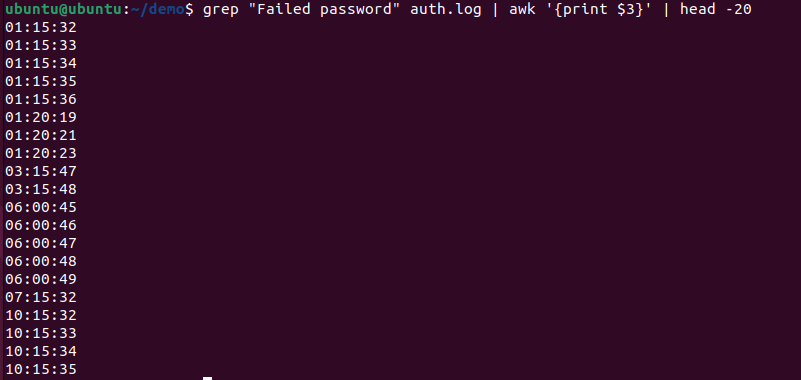
bashgrep "Failed password" /var/log/auth.log | awk '{print $3}' | head -20
What this does:
- Extracts timestamps of failed login attempts
- Shows you the exact times
The Normal human behavior will look something like:
14:00:00
14:01:00
14:02:00
14:03:00
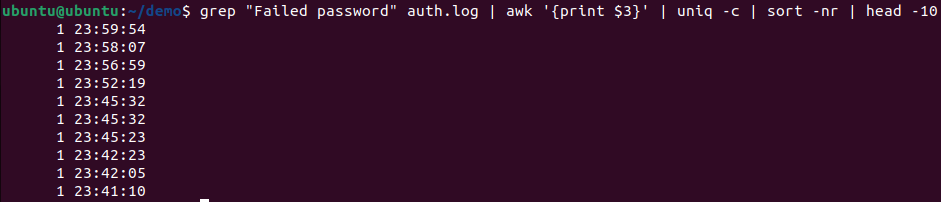
See the difference? Humans are messy. Scripts are perfect. you can also confirm with Frequency Analysis.
bashgrep "Failed password" /var/log/auth.log | awk '{print $3}' | uniq -c | sort -nr | head -10
Finding the Quiet Threat
The Reverse Psychology Everyone looks for: Most common IPs, most failed attempts, highest volume. Almost nobody looks for: The quietest, most careful attacker
The Attack Technique APT (Advanced Persistent Threat) actors don't brute force. They try 2-3 carefully researched passwords over weeks. They avoid triggering volume-based alerts.
so, Let's Find Them Step 1: Invert Your Analysis Instead of finding the MOST active IPs, find the LEAST active:
bashgrep "Failed password" /var/log/auth.log | awk '{print $(NF-3)}' | sort | uniq -c | sort -n | head -10
What's different here:
sort -n(not-nr) - Ascending order, smallest firsthead -10- Shows LOWEST frequency IPsMost analysts investigate the IP with 890 attempts. But look at those IPs - just ONE attempt. Check If That Rare Attempt Succeeded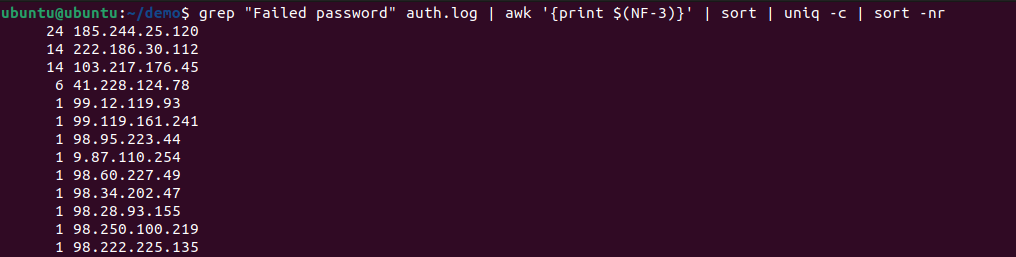 If you see "Accepted password" and the IP is not from your network - BINGO. This is your breach.
While you were investigating 890 failed attempts from a script kiddie in Russia, the real attacker quietly logged in with stolen credentials from that single-attempt IP. They're counting on you being too busy with noise to notice the signal.
When Success is Suspicious (Audit Every Win)
The Mindset Shift Traditional thinking: Failed logins = bad, successful logins = good Reverse thinking: Every success needs verification The Attack Technique? Attackers don't fail forever. Eventually, they succeed. That successful login is your crime scene. Let's Investigate Every Success
first, Pull All Successful Authentications
bashgrep "Accepted password" /var/log/auth.log | tail -30
Ask Questions About Each EVERY successful login, verify:
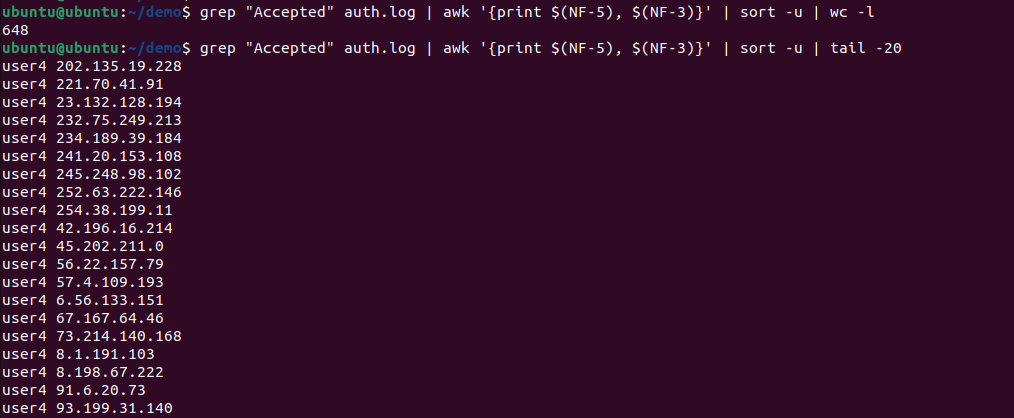
Do I recognize this IPs?
bashgrep "Accepted" /var/log/auth.log | awk '{print $(NF-5), $(NF-3)}' | sort -u
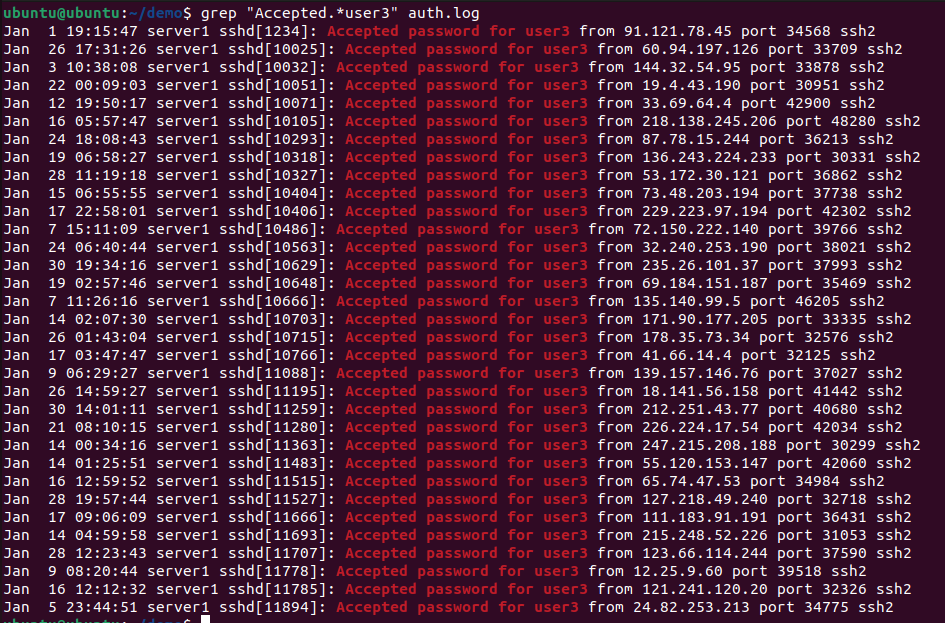
Ask yourself this question: Is this user supposed to log in remotely?
bashgrep "Accepted.*username" /var/log/auth.log
bashgrep "user3" /var/log/auth.log | tail -20
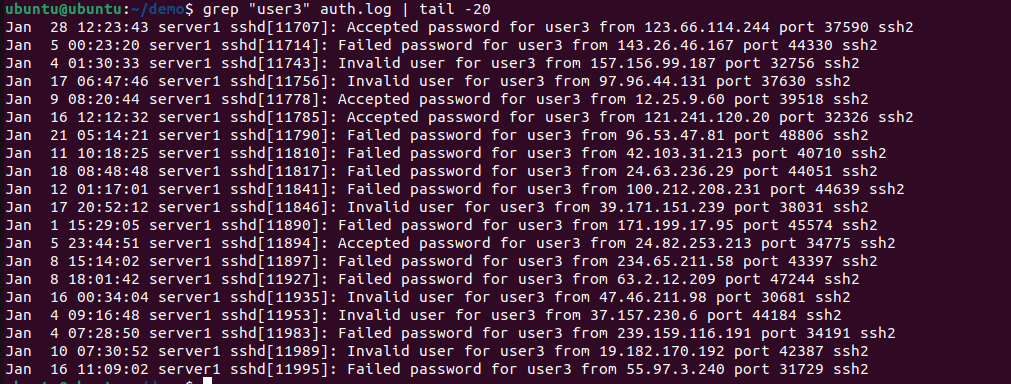
- sudo commands
- File access (from audit logs)
- New user creation
- Service restarts Action: If unauthorized, immediately disable account, force password reset, check for backdoors.
The "Silence is Suspicious" Monitor
The Big Idea Attackers don't just do bad things. They STOP good things from happening.
What Attackers Disable, Before launching ransomware or exfiltrating data, attackers often:
- Stop logging services
- Disable antivirus
- Kill backup jobs
- Turn off monitoring
Let's Detect the Silence, first Check for Service Interruptions
bashgrep "rsyslog\|syslog-ng" /var/log/syslog | grep -i "stop\|exit\|term\|kill" | head -n 10
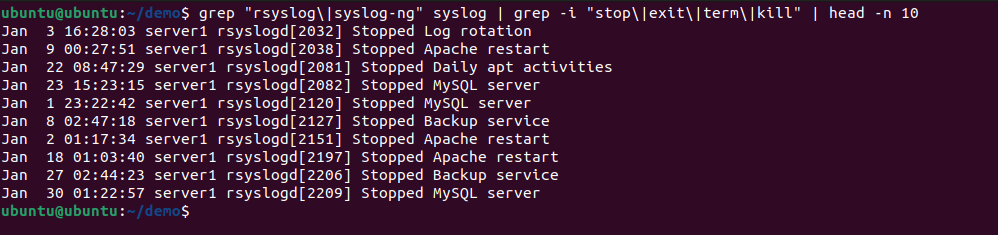
This is a five-alarm fire. The logging service should NEVER stop unless:
- Scheduled maintenance
- System reboot
- Package update None of those at 2:47 AM? Someone disabled logging to hide their tracks.
lets try to Monitor Security Tools...
bash# Check last time antivirus logged anything
grep -i "clamav\|antivirus" /var/log/syslog | tail -1

# Check fail2ban
grep -i "fail2ban" /var/log/syslog | tail -1

# Check AIDE (file integrity)
grep -i "aide" /var/log/syslog | tail -1
If the last entry is from 3 days ago and these tools run hourly, they've been disabled. Action: Treat as active compromise. Investigate what happened between last security tool log and now.
The Geographic Impossibility Test
The Attack Pattern Credential theft is rampant. Your legitimate user's password is for sale on the dark web. The attacker logs in using real credentials. How do you catch them?
The Physics of Travel...A human can't be in two places at once. But compromised credentials can. Track User Locations
bashecho "TIMESTAMP IP_ADDRESS" && grep "Accepted.*john_doe" /var/log/auth.log | awk '{printf "%-20s %s\n", $1" "$2" "$3, $(NF-3)}' | tail -20
then
bash# What did the "real" John do?
grep "192.168.1.50" /var/log/auth.log | grep "john_doe"

# What did the attacker do?
grep "103.48.27.9" /var/log/auth.log | grep "john_doe"
Action:
- Immediately terminate session from unauthorized IP
- Force password reset
- Check for privilege escalation, lateral movement
- Review audit logs for data access
The "Legitimacy Test" (Trust, But Verify)
The Attack Evolution Modern attackers don't look like attackers. They:
- Use real accounts
- Work business hours
- Execute common commands
- Blend in perfectly
The Reverse Approach, Assume every "normal" activity is suspicious until proven legitimate. Demo: The Dormant Account Attack because attackers love old accounts. Ex-employees, contractors, dormant service accounts.
Find Recently Active "Old" Accounts
bash# Extract all users who logged in today
grep "Accepted" /var/log/auth.log | grep "$(date +%b\ %d)" | awk '{print $9}' | sort -u > /tmp/todays_logins.txt

# Compare with your HR database or expected users
cat /tmp/todays_logins.txt
See contractor_mike? He left the company 6 months ago. Why is he logging in? the go ahead and Investigate what the he did:
bashgrep "contractor_mike" /var/log/auth.log | tail -30
also check for any Damage
bashgrep "contractor_mike" /var/log/audit/audit.log | grep "EXECVE" | tail -20
provided you Found: Database dump, file compression, transfer to external server. etc Action: Data breach response protocol. Forensic imaging, legal notification, credential rotation across all systems.
What's NOT Here" Analysis
The Deepest Level of Reverse Thinking This is where it gets interesting. We're not looking at what's IN the logs. We're looking at what SHOULD BE but isn't.
The Attack: The Ghost Admin, An attacker gains root access via an exploit. They do their work. Then they delete their account to cover tracks....But they can't delete the logs from when that account was active.
lets Find Ghost Accounts.
bash# Extract all usernames from auth logs
grep -E "Accepted|Failed|sudo" /var/log/auth.log | awk '{print $9}' | sort -u > /tmp/log_users.txt

# Get current system users
cut -d: -f1 /etc/passwd | sort > /tmp/system_users.txt

# Find users in logs but NOT on system
comm -23 /tmp/log_users.txt /tmp/system_users.txt
Investigate the Ghost's Activity
bashgrep "temp_admin" /var/log/auth.log
You'll see:
- When account was created
- What they accessed
- Privilege escalations
- Last activity before deletion
Check Audit Trails
bashbashgrep "temp_admin" /var/log/audit/audit.log | grep "EXECVE"
Why attackers miss this: They delete the account. They clear auth.log. But they forget audit.log keeps a separate record.
Putting It All Together - The Reverse Thinking Workflow
Your New Investigation Methodology, When an alert fires or you're doing threat hunting, follow this sequence: Phase 1: Check What's MISSING, just give 2 minutes
bash# Time gaps
awk '{print $1, $2, $3}' /var/log/auth.log | cut -d: -f1 | uniq -c

# File tampering
stat /var/log/auth.log | grep Modify

# Service interruptions
grep -i "rsyslog\|fail2ban\|clamav" /var/log/syslog | grep -i "stop" | tail -5
Decision point: Gaps or stopped services? Escalate immediately. Otherwise, continue.
Phase 2: Audit Every SUCCESS, just 3 minutes
bash# All successful logins today
grep "Accepted" /var/log/auth.log | grep "$(date +%b\ %d)"

# Unique IPs
grep "Accepted" /var/log/auth.log | awk '{print $(NF-3)}' | sort -u

# Suspicious timing (off-hours)
grep "Accepted" /var/log/auth.log | grep " 0[0-4]:"
Decision point: Unfamiliar IP or odd timing? Deep dive. Otherwise, continue.
Phase 3: Find the QUIET Threat, another 2 minutes
bash# Rarest IPs
grep "Failed password" /var/log/auth.log | awk '{print $(NF-3)}' | sort | uniq -c | sort -n | head -10

# Check if rare IPs succeeded
grep "45.76.123.45" /var/log/auth.log | grep "Accepted"
Decision point: Rare IP with success? Full forensic analysis. Otherwise, continue.
Phase 4: Detect PERFECT Patterns (2 minutes)
bash# Timing analysis
grep "Failed password" /var/log/auth.log | awk '{print $3}' | head -20

# Frequency check
grep "Failed password" /var/log/auth.log | awk '{print $3}' | uniq -c | sort -nr | head -10

Phase 5: Hunt GHOST Activity, another 3 minutes
```bash
# Users in logs but not on system
grep -E "Accepted|sudo" /var/log/auth.log | awk '{print $9}' | sort -u > /tmp/log_users.txt
cut -d: -f1 /etc/passwd | sort > /tmp/system_users.txt
comm -23 /tmp/log_users.txt /tmp/system_users.txt

# Investigate any ghosts
grep "ghost_username" /var/log/auth.log
Decision point: Ghost accounts? Full incident response. Preserve evidence, contact SIRT.
Therefore in total Time: 12 Minutes In 12 minutes, you've checked what takes traditional analysis hours:
- Log integrity
- Hidden deletions
- Successful compromises
- Targeted attacks
- Automated tools
- Covered tracks
Have a great day....